
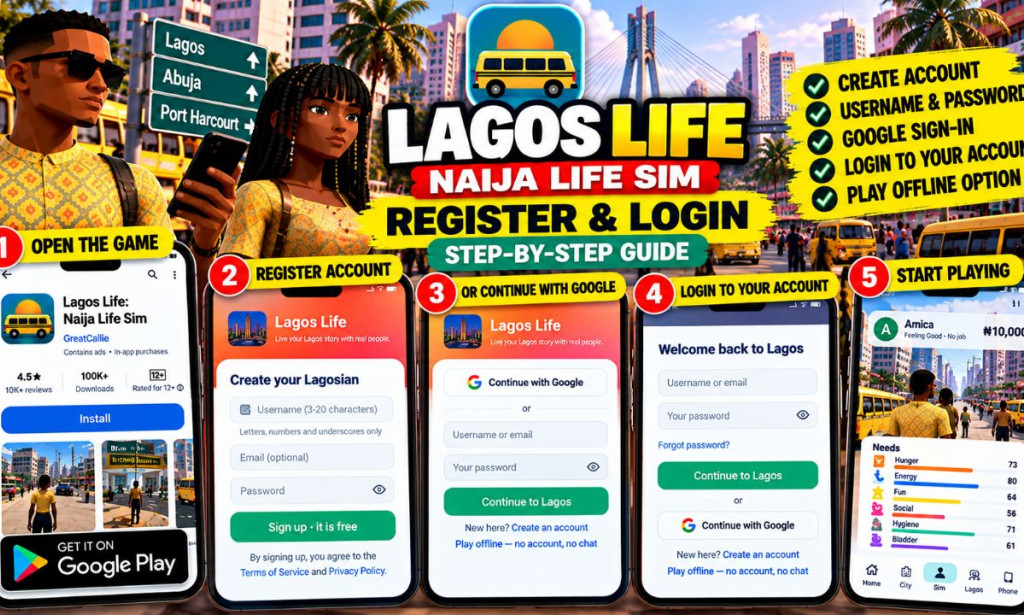
Sign up and Login to Lagos Life: Naija Life Sim
Are you looking for how to create an account or log in to Lagos Life: Naija Life Sim? This step-by-step tutorial explains how to register, choose a username, create a password, use Google sign-in, access your account, recover a forgotten password, and troubleshoot common login problems.
Lagos Life is a Nigerian-themed life simulation game developed by GreatCallie. Players can create virtual characters, explore careers, manage everyday needs, rent houses, travel around the game world, develop skills, and interact with other players through supported online features.
Before enjoying these features, you may want to create an account so that you can access supported online services and cloud-saving functionality.
- Game: Lagos Life: Naija Life Sim
- Developer: GreatCallie
- Registration cost: Free to create an account.
- Registration methods: Username and password or Google sign-in, as supported by the interface.
- Offline option: Available in supported versions without an account.
- Official website: lagoslife.com.ng
- Official support: Lagos Life Support
📋 Table of Contents
- What Is Lagos Life?
- Where to Access the Game
- How to Register a New Account
- How to Choose a Username
- How to Create a Strong Password
- How to Register or Sign In with Google
- How to Login to Lagos Life
- How to Play Without an Account
- How to Recover a Forgotten Password
- What If You Did Not Add an Email?
- Common Registration and Login Problems
- Account Security and Privacy Tips
- Frequently Asked Questions
- Final Thoughts
🎮 What Is Lagos Life: Naija Life Sim?
Lagos Life: Naija Life Sim is a life simulation game that recreates aspects of everyday Nigerian life in a virtual environment.
Players can create characters, explore jobs and careers, manage their virtual money, rent accommodation, use different transportation options, develop skills, and pursue personal goals.
The game includes online features for signed-in users. Depending on the version, these can include chat and cloud saving. The game also offers offline play in supported versions, although offline mode does not provide every online feature.
Creating an account is useful if you want to access the game's supported account-based services rather than playing only in offline mode.
🌐 Where to Access Lagos Life
Always begin with the official website or the official application listing to avoid fake login pages and unofficial versions.
Option 1: Android application
Android users can find the game through its official Google Play listing.
Open Lagos Life on Google Play
Option 2: Official website
You can also visit the official Lagos Life website and look for the available browser-play option.
Option 3: Browser version
If you want to try the game without installing the Android application, visit the official browser-play page.
Open the Lagos Life Browser Game
The available features and login experience may vary depending on your device and the version you use.
📝 How to Register a New Lagos Life Account
If you are a new player, follow these steps to create an account using the registration screen.
Launch the official Android application or open the supported browser version on your device.
On the welcome or login screen, look for Create an account or the option for new users. Select it to open the registration form.
Review the Terms of Service and Privacy Policy. If you agree to the conditions, tick the acceptance checkbox shown on the registration screen.
Choose a username that meets the displayed requirements. The registration screen specifies a length of 3–20 characters using letters, numbers, and underscores.
The registration form marks the email field as optional. However, adding an email address you control may be helpful for account recovery where supported.
Enter a strong password in the password field. Use a password that you do not use for your email, banking, or other important accounts.
Review the information you entered, then select Sign up · it is free or the equivalent registration button shown by your version.
If the game requests further confirmation or displays another setup screen, follow the instructions to complete the process.
👤 How to Choose a Lagos Life Username
Your username identifies your account within the game. Choose something memorable that does not reveal sensitive personal information.
Based on the registration requirements displayed in the game, usernames should:
- Contain between 3 and 20 characters.
- Use supported letters, numbers, and underscores.
- Follow the rules displayed by the registration form.
- Be different from usernames that are already taken.
Examples of usernames
Examples of possible username styles include:
- LagosExplorer
- NaijaGamer24
- CityLife_01
- VirtualHustler
These are only examples. Availability is not guaranteed, and you should choose a username that follows the game's current rules.
🔐 How to Create a Strong Password
Your password helps protect your account. Avoid simple passwords that other people can guess easily.
When creating a password:
- Use a unique password that you do not use on other websites.
- Make it difficult to guess.
- Avoid using your username or personal details as the password.
- Do not share your password with other players.
- Store it securely so you can find it when needed.
If a password manager is available to you, it can help you create and store unique passwords safely.
🔵 How to Register or Sign In with Google
The Lagos Life login screen includes a Continue with Google option. This can provide an alternative to entering a username and password manually.
Steps to use Google sign-in
- Open the official Lagos Life application or supported browser version.
- Go to the welcome or login screen.
- Look for Continue with Google.
- Select the option.
- If prompted, choose the Google account you want to use.
- Review any permissions or confirmation screens.
- Complete the sign-in process and follow the instructions displayed by the game.
The exact screens may vary depending on your device, browser, and Google account settings.
🔑 How to Login to Lagos Life
If you already have a Lagos Life account, you do not need to create another one simply to return to the game. Use the login screen and the method associated with your existing account.
Login using your username and password
Launch the official app or open the supported browser version.
Look for the welcome screen with the username or email field and password field.
Enter the username or email address associated with your account, according to the login form's instructions.
Type the password carefully. Check for accidental spaces, incorrect characters, or keyboard settings that may change what you enter.
Tap Continue to Lagos or the equivalent login button shown on your screen.
If your details are accepted, follow any remaining instructions and wait for your character or dashboard to appear.
Login using Google
If you originally registered or linked your account using Google, choose Continue with Google and follow the authentication steps.
When possible, use the same sign-in method you used previously. Creating a separate account through a different method may not open the same saved progress.
📴 How to Play Lagos Life Without an Account
The login screen provides an option labelled Play offline — no account, no chat in the observed interface.
This option is useful if you want to try supported offline gameplay without registering immediately.
Steps to start offline play
- Open Lagos Life.
- Locate the offline-play option on the welcome or login screen.
- Select Play offline.
- Follow the instructions shown by the game.
- Begin playing if offline mode is available on your device.
Offline play has limitations. Online chat and other account-based features will not be available without the required connection and account access.
Progress may also be stored locally on your device rather than synced to an online account. Review the game's saving instructions before changing devices or deleting the application.
🔄 How to Recover a Forgotten Lagos Life Password
If you cannot remember your password, use the recovery option shown on the official login screen.
Step-by-step password recovery
- Open the official Lagos Life login screen.
- Look for Forgot password?.
- Select the recovery option.
- Follow the instructions displayed by the game.
- Provide the account information requested by the official recovery process.
- Complete any verification or reset steps provided.
- Return to the login screen and try signing in again.
The exact recovery process may depend on how your account was created and what recovery information is associated with it.
📧 What If You Registered Without an Email Address?
The registration screen allows the email field to be left empty. However, an account created without an email address may be more difficult to recover if you forget the password.
The official support information indicates that users with username-only accounts may need to contact support for assistance with account recovery.
If you cannot access your account and did not associate an email address, contact the official support team:
Support email: hello@lagoslife.com.ng
Explain the problem clearly and provide only the account information reasonably needed to identify your account. Never include your password in a support request.
🛠️ Common Registration and Login Problems
1. The username is not accepted
Check that the username follows the displayed character and length requirements. If the name is already taken, try another permitted username.
2. The password does not work
Check for typing mistakes, extra spaces, and keyboard settings. If you still cannot sign in, use the official password recovery process.
3. Google sign-in does not complete
Check your internet connection and confirm that your browser or Google sign-in window is working properly. Try again through the official app or website.
4. The game keeps loading
Check your internet connection. If you are using the browser version, refresh the page or try a supported, updated browser.
5. Your saved character is missing
Confirm that you are signing in with the same account and login method you previously used. Offline progress may be stored separately from cloud saves.
6. You cannot recover your account
If the recovery option does not work, consult the official support page or email the support team. Accounts without an associated email may require additional help.
7. You are asked to register again
Before creating a new account, check whether you have selected the correct login method. Using a different sign-in option may not open your existing account.
🛡️ Account Security and Privacy Tips
Protecting your account is important, especially if you use online chat and other social features.
- Use the official game website or app listing.
- Never share your password with another player.
- Do not send verification codes to strangers.
- Use a unique password.
- Avoid publishing sensitive personal information in your profile or chats.
- Be cautious of anyone promising cash rewards for your login details.
- Read the privacy policy to understand how account information is handled.
- Use official support if you suspect your account has been compromised.
You can read the game's official policies below:
❓ Frequently Asked Questions
1. Is registering for Lagos Life free?
The registration screen states that signing up is free. Optional in-game purchases may be available separately.
2. What do I need to register?
You need a username and password. The registration screen also offers an optional email field and a Google sign-in option.
3. What is the minimum username length?
The observed registration screen specifies 3–20 characters using letters, numbers, and underscores.
4. Can I log in with Google?
Yes. The login screen includes a Continue with Google option. Follow the instructions displayed on the official sign-in screen.
5. Can I play without registering?
The game provides an offline-play option in supported versions. The offline mode does not include all online features, such as chat.
6. What should I do if I forget my password?
Use the Forgot password option on the login screen and follow the official recovery instructions.
7. Can I recover an account without an email?
It may be possible with help from official support. Contact hello@lagoslife.com.ng for guidance and do not share your password.
8. Where can I play Lagos Life in a browser?
Visit the official browser-play page and follow the available instructions.
9. Will my progress be saved?
Cloud saving is available for signed-in users where supported. Offline progress may be stored locally on the device, so check the game's saving information before switching devices.
10. Where can I get help with my account?
Visit the official support page or email hello@lagoslife.com.ng.
✅ Final Thoughts
Registering and logging in to Lagos Life: Naija Life Sim is straightforward when you follow the instructions on the official game screen.
New players can create an account using a username and password or choose Google sign-in where supported. Existing players should use the login method associated with their account. If you want to explore the game without registering, offline play is available in supported versions.
For a smoother experience, choose a username that follows the game's rules, create a strong password, and keep your account details private. If you encounter login problems, use the official recovery process or contact the support team.
Start here: Visit the official Lagos Life website.
Android users: Open Lagos Life on Google Play.

You must be logged in to post a comment.