
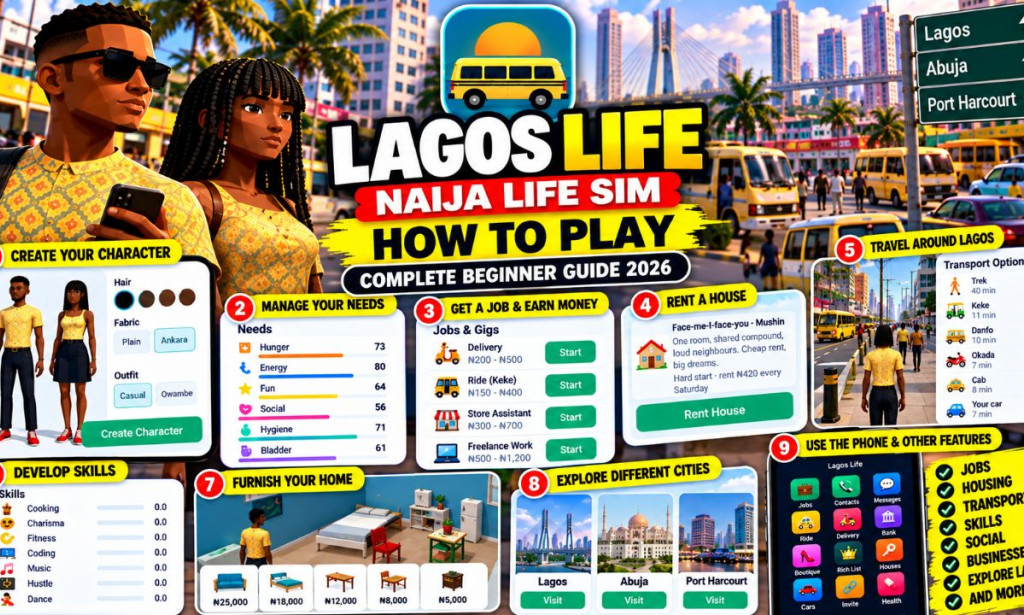
Play Lagos Life: Naija Life Sim – Complete Beginner's Guide
Are you new to Lagos Life: Naija Life Sim and wondering how to play, get a job, earn money, rent a house, travel around the city, and build your character's virtual life? This beginner's guide explains the main gameplay features and how to get started.
Lagos Life is a Nigerian-themed life simulation game developed by GreatCallie. Instead of concentrating on traditional action or racing gameplay, it lets you experience a virtual lifestyle inspired by everyday Nigerian life.
You can create a character, manage everyday needs, explore careers, develop skills, rent accommodation, use different transportation options, and work toward personal goals within the game.
Whether you are playing for the first time on Android or accessing the game through a supported browser, this guide will help you understand the basic gameplay systems.
- Game name: Lagos Life: Naija Life Sim
- Developer: GreatCallie
- Genre: Life simulation
- Setting: A virtual world inspired by Nigeria
- Main activities: Jobs, skills, housing, transport, character needs, and social features
- Android: Available through Google Play
- Browser version: Available through the official website, subject to compatibility
- Official website: lagoslife.com.ng
📋 Table of Contents
- What Is Lagos Life?
- How to Open and Start the Game
- How to Create Your Character
- Understanding the Game Dashboard
- How to Manage Your Character's Needs
- How to Find a Job
- How to Earn Virtual Money
- How to Develop Skills
- How to Rent a House
- How to Furnish Your Home
- How to Travel Around Lagos
- How to Explore Other Cities
- How to Use Social Features
- How to Complete Aspirations
- Beginner Tips for Progressing Faster
- Can You Play Offline?
- Does the Game Pay Real Money?
- Common Problems and Solutions
- Frequently Asked Questions
- Final Thoughts
🎮 What Is Lagos Life: Naija Life Sim?
Lagos Life is a life simulation game that allows players to manage a virtual character in a world inspired by Nigerian cities and everyday experiences.
Rather than simply completing racing tracks or fighting enemies, you spend time building your character's lifestyle. You may look for work, manage your character's needs, rent a place to live, develop skills, travel, and interact with other players when online features are available.
The game includes virtual money, which you can use for supported in-game expenses and purchases. You can also work toward different aspirations, such as career progress, friendships, or building virtual wealth.
The experience is designed around everyday decisions. How you spend your time, which activities you choose, where you live, and how you manage your character all contribute to your progress.
📱 How to Open and Start the Game
The first step is to access an official version of Lagos Life.
Method 1: Play on Android
Use the link below to find Lagos Life: Naija Life Sim.
Check the game name and developer, then tap Install if the application is available and compatible with your device.
After installation, tap Open and wait for the game to load.
Method 2: Play through a browser
If you prefer not to install the Android application, you can try the official browser version.
Browser compatibility may vary depending on your device, operating system, and browser version.
Should you create an account?
The game offers account-based access as well as offline play in supported versions. Creating an account is useful if you want to use supported online features and cloud saving.
If you choose to register, follow the instructions displayed on the official game screen and use a password that you do not use for other important accounts.
👤 How to Create Your Character
Character creation is one of the first important steps in Lagos Life. It allows you to create a virtual person who will live and progress in the game.
The character-creation interface includes options such as appearance, hairstyles, clothing, and fabric styles. Available options may change as the game is updated.
Steps for creating a character
- Open the character-creation screen.
- Select the available character type.
- Choose a hairstyle and other appearance options.
- Select your preferred clothing and fabric style.
- Choose a username or character name where requested.
- Review the available personality traits.
- Select an aspiration if the game asks you to choose one.
- Confirm your selections and continue.
What are personality traits?
Personality traits help give your character a particular identity. The game has displayed options such as Hustler, Foodie, Gym Rat, Smooth Talker, Clean Pikin, Night Crawler, and other personality types.
Read the descriptions shown in the game before making your choice. The exact effects of each trait should be confirmed through the current gameplay rather than assumed.
📊 Understanding the Game Dashboard
Once you enter the game, spend some time learning the dashboard. The interface contains information and menus that help you manage your virtual life.
| Dashboard element | Purpose |
|---|---|
| Character profile | Shows information about your character and current status. |
| Virtual money | Displays your in-game currency balance. |
| Needs | Shows needs such as hunger, energy, fun, social interaction, hygiene, and bladder. |
| Skills | Displays skill progress where supported. |
| Jobs | Provides access to available career and work opportunities. |
| Housing | Lets you explore supported accommodation options. |
| Transport | Provides travel options for moving around the game world. |
| Phone menu | Provides shortcuts to various game activities and services. |
| Social features | Offers access to supported communication and community activities. |
Menu names and layouts can differ between versions. Tap each available menu and read the descriptions to understand what it does before spending virtual money.
❤️ How to Manage Your Character's Needs
Managing your character's needs is an important part of the game. Lagos Life displays several needs that represent different aspects of everyday life.
Hunger
Hunger represents your character's need for food. Explore the available food and cooking options when your character needs to eat.
Energy
Energy represents your character's ability to continue performing activities. Check the game's available ways to restore energy before beginning a long activity.
Fun
Fun represents your character's entertainment needs. Explore available activities that help improve this meter.
Social
Social needs relate to interaction with other characters or players, depending on the available gameplay features.
Hygiene
Hygiene represents personal cleanliness. Use the relevant in-game facilities or activities when necessary.
Bladder
This meter represents another everyday character need. Follow the available in-game instructions when it requires attention.
💼 How to Find a Job in Lagos Life
Jobs and careers are among the main features of Lagos Life. They provide a way to develop your character and participate in the game's virtual economy.
Step-by-step job guide
Find the Jobs icon in the game interface or phone menu.
Look through the careers or work activities currently available to your character.
Some activities may require particular skills, character progress, or other conditions. Check the information displayed before selecting an opportunity.
Choose an available job or gig and follow the on-screen instructions.
After completing the activity, review your character's progress and virtual balance if a reward is provided.
The careers and rewards available may change with game updates. Check the current interface for accurate information about individual jobs.
💰 How to Earn Virtual Money
Lagos Life uses virtual currency as part of its gameplay. The official game description identifies jobs and gigs as ways to earn in-game money.
To make progress, explore the work activities available to your character and learn how the game's reward system works.
Tips for managing your virtual income
- Check the Jobs menu regularly for available activities.
- Read the requirements before selecting an activity.
- Monitor the time and costs associated with your choices.
- Avoid unnecessary purchases when your balance is low.
- Keep your character's needs under control.
- Review your balance after activities that offer rewards.
There is no need to purchase virtual currency simply to begin learning the game. Explore the available free gameplay first and decide whether optional purchases are necessary for your personal enjoyment.
🧠 How to Develop Skills
Skills allow you to develop your character and explore different activities. Depending on the current version, the game may include skills associated with cooking, charisma, fitness, coding, music, hustle, and dance.
How to approach skill development
- Open your character's skills section.
- Review the skills currently displayed.
- Look for activities related to the skill you want to develop.
- Check any time, money, or character requirements.
- Complete the activity and review your progress.
For example, if you are interested in cooking, explore the available food preparation activities. If you want to develop another skill, check which in-game actions contribute to it.
Do not assume that every skill automatically unlocks a job or reward. Follow the current game's descriptions and requirements.
🏠 How to Rent a House
Housing is another important part of Lagos Life. The game offers different virtual accommodation types, with different rent costs and living arrangements.
The housing interface has displayed options such as:
- Face-me-I-face-you in Mushin: A shared-room option with lower virtual rent.
- Self-contain in Yaba: An option with a private toilet and kitchen corner.
- Mini-flat in Lekki Phase 1: A more expensive virtual accommodation option.
- Duplex in Ikoyi: A higher-tier option shown as locked in the observed interface.
- Mansion in Banana Island: Another higher-tier option shown as locked in the observed interface.
These options and prices may change as the game develops. Always check the current housing menu for the latest information.
Steps to rent a house
- Open the Houses or Housing section.
- Browse the available accommodation.
- Check the rent and payment schedule shown in the game.
- Compare the cost with your current virtual balance.
- Select a property if you meet the requirements.
- Follow the on-screen instructions to move in.
Choosing affordable accommodation can help you preserve virtual currency for other activities.
🛋️ How to Furnish and Customize Your Home
Some housing features allow you to view, furnish, or customize your virtual home.
Depending on the available options, you may be able to buy furniture, arrange items, and make changes to your living space.
Basic home-customization guide
- Enter your current home.
- Look for the furniture, decor, or home-planning options.
- Review the available items and their prices.
- Choose an item you want to purchase.
- Follow the instructions for placing or arranging it.
- Review your home after making changes.
Some editing features may depend on the current housing option or available game mode. If a feature is locked, check the instructions displayed by the game rather than assuming it is available to every player.
🚕 How to Travel Around Lagos
Transportation is one of the features that gives Lagos Life its Nigerian setting. The game has displayed different travel options inspired by everyday transport in Nigeria.
These options have different virtual costs and estimated travel times. The exact choices available depend on the destination and current version.
| Transport option | What to Know |
|---|---|
| Walking | A travel option that may be free but can take longer. |
| Keke | A motorized tricycle option inspired by Nigerian transport. |
| Danfo | A minibus-style transport option. |
| Okada | A motorcycle taxi-style option. |
| Cab | A private vehicle option that may cost more than some alternatives. |
| Personal vehicle | May be available when the character has access to a vehicle. |
How to travel to another location
- Open the map or travel interface.
- Select the destination you want to visit.
- Review the available transport options.
- Compare the displayed costs and travel times.
- Select your preferred option.
- Follow the progress shown by the game until you arrive.
When your virtual balance is limited, consider whether walking or a cheaper transport option suits your needs. Faster travel may be useful when you want to reach a destination quickly, but always check the displayed cost first.
🌍 How to Explore Other Cities
The game has presented Lagos alongside options for Abuja and Port Harcourt. Available destinations and activities may depend on the current game version and your progress.
To explore another city:
- Open the City or Map section.
- Review the available destinations.
- Select a destination that the game allows you to visit.
- Follow any travel or unlocking instructions displayed on the screen.
- Explore the available activities after arriving.
If a destination is locked or unavailable, check whether the game lists a requirement you must meet first.
🤝 How to Use Social Features
Lagos Life includes online social features that can allow signed-in players to interact. Depending on the available version, the game may provide public chat, direct messages, presence information, and community activities.
These features can make the virtual world feel more active, but you should use them carefully.
Social safety tips
- Do not share your password or verification codes.
- Avoid posting your home address, phone number, or sensitive personal information.
- Be cautious of strangers who ask you to send them money.
- Do not trust claims that someone can convert virtual naira into real cash.
- Use the available block or report tools if another player behaves inappropriately.
- Read the game's privacy policy to understand how account and social information is handled.
You can review the official privacy policy here:
🎯 How to Complete Aspirations and Goals
Aspirations give your character objectives to work toward. The game has displayed goals associated with careers, housing, music, friendships, and startup-related progress.
Examples shown in the character-creation interface include:
- Oga at the Top: A career-related aspiration.
- Lekki Landlord: A virtual wealth goal.
- Afrobeats Star: A music-related aspiration.
- Everybody's Padi: A friendship-related aspiration.
- Yaba Unicorn: A startup-related aspiration.
These are in-game goals, and the requirements may change as the game is updated.
Tips for completing your goals
- Read the aspiration description carefully.
- Identify the actions or milestones required.
- Check your current progress.
- Choose activities that help you work toward the goal.
- Monitor your progress and adjust your approach.
Choosing a goal can give your gameplay more direction. Instead of performing random activities, you can focus on developing the skills, relationships, or virtual resources associated with your aspiration.
⭐ Beginner Tips for Progressing in Lagos Life
1. Learn the menus first
Spend time exploring the main interface before spending virtual currency. Understanding the available features helps you make better decisions.
2. Manage your character's needs
Check hunger, energy, hygiene, fun, social interaction, and other needs regularly. Do not ignore the status indicators while pursuing another activity.
3. Explore the Jobs menu
Review the opportunities available to your character and check their requirements. Jobs and gigs are among the game's advertised virtual earning methods.
4. Avoid expensive housing too early
Compare rent costs and payment schedules before moving. More expensive accommodation may not be practical when you are still building your virtual balance.
5. Compare transport costs
Check the fare and estimated travel time before selecting transportation. Choose an option that fits your current needs and virtual budget.
6. Develop skills that match your goals
Read your aspiration and look for activities that support it. This can help you concentrate on relevant aspects of the game.
7. Be careful with optional purchases
You can explore the free gameplay before deciding whether to buy virtual currency. Never spend money expecting the game to return it as cash.
8. Protect your account
Use a strong password, keep your login information private, and use official sources when accessing the game.
📡 Can You Play Lagos Life Offline?
The game offers an offline-play option in supported versions. Offline play can be useful when you want to experience the simulation without signing in, but it does not provide every online feature.
| Feature | What to Expect |
|---|---|
| Offline gameplay | Available in supported versions. |
| Online chat | Requires an internet connection and supported account access. |
| Cloud saving | Available for signed-in users where supported. |
| Local saving | Offline progress may be stored on the device. |
| Cross-device progress | Depends on account access and the game's cloud-save system. |
If you want to continue your progress on another device, check the game's saving instructions and sign-in options before relying on local offline data.
💸 Does Lagos Life Pay Real Money?
This is an important question because some people search for games that provide cash rewards.
Lagos Life's virtual currency cannot be redeemed for real money under its published terms. You can earn and spend virtual currency as part of the simulation, but that does not mean you can withdraw the balance into a bank account or mobile wallet.
| Activity | What It Means |
|---|---|
| Completing jobs | Gameplay progression and potential virtual rewards. |
| Building virtual wealth | Progress within the game's economy. |
| Renting a virtual home | A gameplay expense, not physical property ownership. |
| Buying virtual currency | An optional purchase for use inside the game. |
| Withdrawing cash | Virtual currency cannot be redeemed for real money. |
For official information, read the game's terms:
Official Lagos Life Terms of Service
🛠️ Common Gameplay Problems and Solutions
The game will not load
Check your internet connection, restart the app or browser, and try again. If you are using a browser, ensure that it is updated and supports the game.
You cannot sign in
Check that you are using the correct login method and account details. If you have forgotten your password, use the official recovery option or contact support.
Your virtual money seems to have changed
Review the game's transaction or balance information where available. Consider whether you recently paid rent, travelled, or purchased an item.
A job or feature is locked
Read the requirements displayed by the game. Some activities may require specific progress, skills, or other conditions.
Your progress is missing
Confirm that you are using the same account as before. If you played offline, some progress may be saved locally rather than in the cloud.
Where can you get help?
Visit the official support page for account and gameplay guidance:
You can also contact the support team at hello@lagoslife.com.ng.
❓ Frequently Asked Questions
1. How do I play Lagos Life for the first time?
Open the official game, create a character or sign in, learn the dashboard, and follow the available instructions to begin exploring the virtual world.
2. How do I get a job in Lagos Life?
Open the Jobs menu, review the available opportunities, check the requirements, and follow the instructions for any activity you choose.
3. How do I earn money in the game?
Explore supported jobs and gigs. These activities can provide virtual currency according to the game's mechanics.
4. Can I withdraw my Lagos Life balance?
No. The official terms state that the game's virtual currency cannot be exchanged for real cash.
5. Can I play Lagos Life on a computer?
You can try the official browser version on a compatible computer. Available features and performance may vary.
6. Can I play without an account?
The game provides offline play in supported versions. However, offline play does not include all online features.
7. How do I buy a house?
Open the housing section, review the available properties and their virtual costs, and follow the on-screen instructions for an option you can access.
8. How do I travel around Lagos?
Open the map or travel interface, choose a destination, compare the available transport options, and select one.
9. Does Lagos Life require payment to play?
The game is free to start, although optional in-game purchases may be offered. Review the details before making a purchase.
10. Where can I download Lagos Life?
Android users can visit the official Google Play listing. Other users can check the official website for supported access methods.
✅ Final Thoughts: How to Enjoy Lagos Life
Lagos Life: Naija Life Sim gives players an opportunity to explore a virtual Nigerian lifestyle through character creation, careers, skills, housing, transport, and social activities.
For beginners, the best approach is to understand the dashboard, keep your character's needs under control, explore available jobs, manage virtual expenses, and work toward an aspiration that interests you.
You do not need to rush through every feature. Learn the gameplay systems gradually and check the current interface whenever a menu or activity is unfamiliar.
Most importantly, remember that the money you earn in the simulation is virtual currency. The game's published terms do not permit it to be exchanged for real cash.
Start playing: Visit the official Lagos Life website.

You must be logged in to post a comment.