
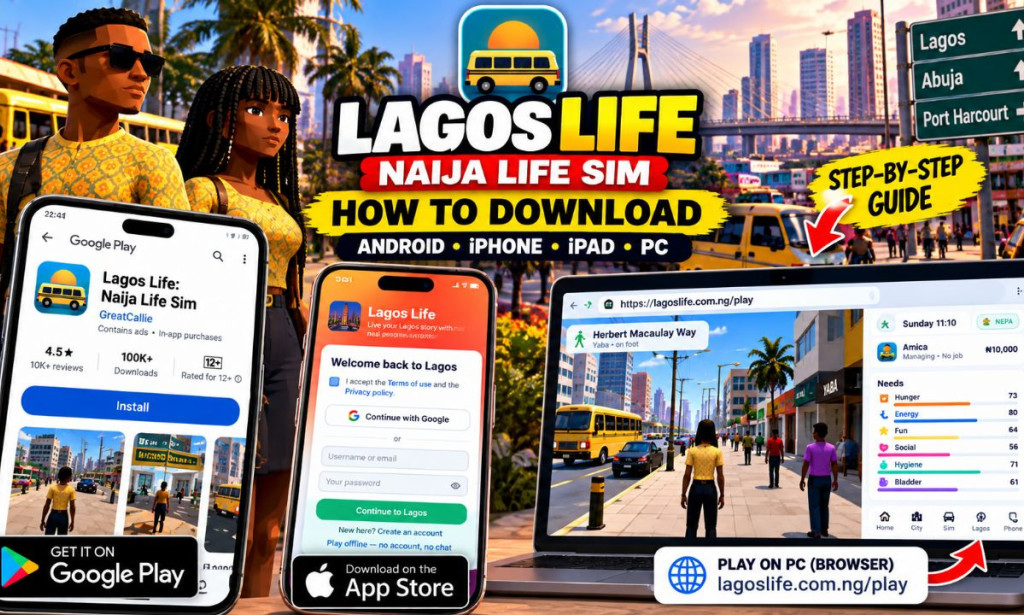
How to Download Lagos Life: Naija Life Sim on Android, iPhone, iPad and PC
Are you looking for how to download Lagos Life: Naija Life Sim and start experiencing a virtual Nigerian lifestyle? This guide explains how to access the game on Android phones, iPhones, iPads, computers, and other compatible devices.
Lagos Life is a life simulation game inspired by everyday life in Nigeria. Players can create virtual characters, find jobs, manage their needs, rent houses, explore locations, use different means of transportation, develop skills, and interact with other players when using supported online features.
Whether you want to start your virtual journey in Lagos, explore the game's other cities, or simply see what the gameplay looks like, this tutorial will help you choose the appropriate download or play method for your device.
- Game: Lagos Life: Naija Life Sim
- Developer: GreatCallie
- Android: Available through Google Play.
- iPhone and iPad: The official website has listed the iOS app as coming soon. Browser access may be available instead.
- PC: Try the official browser version.
- Cost: The game is free to start, with optional in-game purchases.
- Official website: lagoslife.com.ng
📋 Table of Contents
- What Is Lagos Life: Naija Life Sim?
- Requirements Before Downloading
- How to Download on Android
- How to Play on iPhone and iPad
- Is the iOS App Available?
- How to Play on PC or Laptop
- How to Play Through a Web Browser
- What Can You Do in the Game?
- How to Create an Account
- Can You Play Offline?
- Is It Safe to Download?
- Common Download and Login Problems
- Is Lagos Life Free?
- Frequently Asked Questions
- Final Thoughts
🎮 What Is Lagos Life: Naija Life Sim?
Lagos Life: Naija Life Sim is a Nigerian-themed life simulation game developed by GreatCallie. It allows players to build a virtual life in a game world inspired by Nigeria, including its cities, housing, transportation, jobs, food, and social activities.
Rather than focusing exclusively on fighting or racing, the game revolves around managing your character's everyday life. You can monitor your character's hunger, energy, hygiene, social needs, and other requirements while working toward different in-game goals.
The game also includes features such as character customization, virtual housing, careers, transportation, skills, and social interactions. Some features require an internet connection and an account.
It is important to understand that the money displayed in the game is virtual currency. It is used for gameplay and should not be confused with real Nigerian naira that can be withdrawn into a bank account.
📱 Requirements Before Downloading
Before installing or opening the game, check the following requirements.
| Requirement | What You Need to Know |
|---|---|
| Android phone | A compatible Android device with access to Google Play. |
| iPhone or iPad | Safari or another supported browser for website access. Availability of a native iOS app must be checked through official sources. |
| Computer | A modern browser such as Chrome, Edge, Firefox, or Safari. |
| Internet connection | Recommended for downloading, signing in, cloud saves, and online social features. |
| Storage space | Enough free storage for the app and its data. Check Google Play for the current download size. |
| Account details | A username and password if you want to create an account. Google sign-in is also offered. |
🤖 How to Download Lagos Life on Android
Android users can download the game through its official Google Play listing. This is the recommended method because it helps you obtain the version published by the developer rather than an unofficial or modified APK.
Unlock your Android phone and open the Google Play Store application. Make sure you are using the correct Google account if the store requests one.
You can search for Lagos Life: Naija Life Sim in the Play Store, or open the official listing using the button below.
Check that the title is Lagos Life: Naija Life Sim and that the developer is GreatCallie. Confirm that the listing matches the game you want before continuing.
If your device is compatible and the listing is available in your region, tap Install. Wait while Google Play downloads and installs the application.
Once installation is complete, tap Open. You can also find the game's icon in your app drawer or on your home screen.
Follow the on-screen instructions. You may create an account, use an available sign-in option, or choose offline play if the game offers that option on your device.
What if the Install button does not appear?
If Google Play says the game is unavailable or incompatible, check whether your Android version meets the current requirements. Also confirm that your device has sufficient storage and that the app is available in your region.
Do not download a random APK from an unfamiliar website just because the Play Store installation is unavailable.
🍎 How to Play Lagos Life on iPhone and iPad
iPhone and iPad users should distinguish between downloading a native iOS application and playing a game through a web browser.
The official Lagos Life website has provided browser-based access, while its iOS app has been listed as coming soon. If the native app is not yet available in your region, you can try accessing the official browser version instead.
Method 1: Open the game in Safari
On your iPhone or iPad, open Apple's Safari browser.
Go directly to the official Lagos Life website:
Look for the option to play the game online. You can also visit the official browser-play page directly:
If the game loads and your browser is supported, follow the available instructions to start playing or sign in.
If the website works well on your device, you may be able to create a shortcut using Safari's Share menu and the Add to Home Screen option. This creates a shortcut to the website; it does not necessarily install a separate native iOS app.
Method 2: Check for the official iOS app
If you prefer downloading the game from the Apple App Store, visit the official website for current availability. Only install a listing that can be verified as the official game.
Check Lagos Life's Official Website
📲 Is the Lagos Life iOS App Available?
At the time this guide was prepared, the official website listed the iOS app as coming soon. This means readers should not assume that a native iPhone or iPad version is already available for download.
Availability may change after this article is published. Before attempting to install an iOS version, check the developer's official website and the Apple App Store.
| iOS option | Explanation |
|---|---|
| Native iPhone app | Check the Apple App Store for an official listing. Availability may change. |
| Safari browser | Try the official browser-play website if it supports your device. |
| Home-screen shortcut | May provide quicker access to the website but is not proof that a native app is installed. |
| Unofficial iOS installer | Avoid unknown installation services and profiles claiming to provide an unofficial copy. |
💻 How to Play Lagos Life on PC or Laptop
If you want to experience Lagos Life on a larger screen, you can try the official browser version on a computer.
Steps to play on a computer
Turn on your computer and launch a modern web browser, such as Google Chrome, Microsoft Edge, Firefox, or Safari.
Open the following address:
Give the website time to load. A reliable internet connection can help reduce loading problems.
Follow the website's available instructions. If you already have an account, use the appropriate sign-in option to access your saved game where supported.
Follow the controls displayed by the game. The browser version may use different controls or have different limitations compared with the Android app.
Can you install the Android version on a PC?
Some people use Android emulators to run mobile games on computers. However, compatibility with Lagos Life is not guaranteed, and an emulator is not required if the official browser version works on your computer.
Try the official browser version first. If you decide to use an emulator, obtain it from its official developer and avoid modified game packages.
🌐 How to Play Lagos Life Without Downloading an App
If you do not want to install the Android app, the official website offers another route to access the game through a browser.
- Connect your phone or computer to the internet.
- Open a supported browser.
- Visit the official Lagos Life browser-play page.
- Wait for the page to load.
- Follow the available instructions to begin playing.
Browser play can be convenient when you want to try the game without installing a mobile application. However, browser compatibility and performance may vary depending on your device, browser, and internet connection.
🏙️ What Can You Do in Lagos Life?
After successfully opening the game, you can explore its virtual Nigerian lifestyle features. The exact experience may change as the developer updates the game.
1. Create and customize your character
You can create a virtual character and choose from available appearance options. These include hairstyles, clothing styles, fabric choices, and other customization settings.
2. Explore Nigerian city environments
The game includes Lagos and provides options for other Nigerian cities, including Abuja and Port Harcourt. Available locations and activities depend on the current game version.
3. Find jobs and develop skills
Players can explore careers, activities, and skills to progress within the virtual world. These are game mechanics rather than guaranteed real-world employment opportunities.
4. Rent and furnish a home
Housing is part of the simulation. The game presents different virtual housing options with different rent costs and living arrangements.
5. Use different means of transportation
Transportation options include choices inspired by Nigerian everyday travel. The available options have different in-game costs and travel times.
6. Manage your character's needs
Your character has needs such as hunger, energy, hygiene, fun, and social interaction. Managing these needs is part of the gameplay.
7. Interact with other players
Online features may allow you to interact with other signed-in players. Chat and social features require care because messages and public profiles can be visible to other users.
📝 How to Create a Lagos Life Account
If you want to save progress online or use supported social features, you may choose to create an account.
- Open the official app or browser version.
- Select the option to create an account or sign up.
- Review the terms and privacy policy.
- Enter a username that meets the displayed requirements.
- Provide an email address if requested or if you want to associate one with your account.
- Create a strong password.
- Complete the registration process.
- Sign in and follow the instructions to begin your virtual life.
The available sign-in methods may include Google sign-in. Use only the options displayed by the official game.
📡 Can You Play Lagos Life Offline?
Lagos Life provides an offline-play option in supported versions. However, offline play is not the same as having access to every online feature.
| Feature | What to Expect |
|---|---|
| Offline gameplay | Available through the game's offline option where supported. |
| Online chat | Requires an internet connection and supported online access. |
| Cloud saving | Available to signed-in users where supported. |
| Local saving | Offline progress may be stored on the device. |
| Cross-device progress | Depends on signing in and the game's supported cloud-save system. |
If you want your progress available on more than one device, check the game's saving instructions before relying on local offline data.
🔐 Is It Safe to Download Lagos Life?
The safest starting point is the official Google Play listing or the developer's official website. These sources help you avoid fake versions and unofficial installers.
Before installing the game, consider the following precautions:
- Confirm that the app name and developer match the official listing.
- Read the app's current permissions and privacy information.
- Use a strong, unique password when creating an account.
- Be careful about sharing personal information in public chats.
- Avoid unofficial APK downloads and modified versions.
- Do not pay someone who claims they can unlock guaranteed earnings from the game.
- Review any in-app purchase carefully before confirming payment.
Android users should start with the official Google Play listing:
🛠️ Common Download, Installation and Login Problems
Problem 1: The game will not download
Check your internet connection, available storage, Play Store status, and device compatibility. Restarting the device and trying again may help.
Problem 2: The game is not available in your region
Availability can vary by country and device. Check the official listing and website for updates. Avoid unofficial downloads that promise to bypass regional restrictions.
Problem 3: The game gets stuck loading
Check your internet connection and try reopening the app or browser. If you are using a browser, update it and try loading the official game page again.
Problem 4: You cannot log in
Confirm that you are using the correct username, password, or sign-in method. If you have forgotten your password, use the recovery option shown by the game.
If you registered with a username but did not associate an email address, account recovery may require help from official support.
Problem 5: Your progress is missing
Check whether you are using the same account as before. If you previously played offline, the progress may have been saved locally rather than in the cloud.
Problem 6: You want to install an APK
First check whether the official developer provides an APK download. If no official APK source is available, do not assume that files hosted on third-party websites are genuine.
Where can you get help?
For account, installation, or gameplay questions, visit the official support page:
You can also contact the support team at hello@lagoslife.com.ng.
💰 Is Lagos Life Free to Download and Play?
Lagos Life is free to start, but some optional purchases are available. The mobile listing indicates that the app contains ads and in-app purchases, while the official privacy policy states that the game has no advertising SDK. This difference in the published information is worth noting; check the current app listing and game experience for the latest details.
| Item | Information |
|---|---|
| Initial access | Free to start on supported platforms. |
| Optional purchases | Virtual currency top-ups may be available. |
| Mandatory investment | No mandatory investment is stated as a requirement to play. |
| Virtual currency | Used for in-game activities and purchases. |
| Real-money withdrawal | In-game naira cannot be redeemed for real cash. |
❓ Frequently Asked Questions
1. Where can I download Lagos Life for Android?
You can access the official Google Play listing here: Download Lagos Life on Google Play.
2. Can I download Lagos Life on iPhone?
The official website has listed the iOS app as coming soon. Check the Apple App Store and the official website for current availability. You can also try the browser version if it supports your device.
3. Can I play Lagos Life on my iPad?
You can try the official browser version in Safari. Whether it works properly depends on current browser compatibility and the game's requirements.
4. Can I play Lagos Life on a computer?
You can try the official browser version on a compatible PC or laptop. Browser performance and available features may vary.
5. Is there an official Lagos Life APK?
Use Google Play unless the developer provides an official APK download. Do not assume that APK files on unrelated websites are genuine.
6. Can I play Lagos Life without an account?
The game provides an offline-play option in supported versions. Offline play does not include all online features, such as player chat.
7. Does Lagos Life pay real money?
No. The virtual currency used in the game cannot be exchanged for real cash or withdrawn to a bank account. The game should not be treated as a source of real-money earnings.
8. Do I have to pay to play?
The game is free to start, although optional in-game purchases may be offered. Review each purchase before paying.
9. What should I do if the game does not open?
Check your internet connection, device compatibility, available storage, and browser or app updates. If the problem continues, consult the official support page.
10. Where can I find official updates?
Visit the official Lagos Life website or its Google Play listing.
✅ Final Thoughts
Lagos Life: Naija Life Sim offers a virtual Nigerian lifestyle experience with character customization, jobs, housing, transportation, skills, and other simulation features.
For Android users, the recommended method is downloading the game through Google Play. iPhone and iPad users should check whether the native iOS version has been released or try the official browser version. PC users can also test browser access.
Always use official sources, protect your account details, and review optional purchases before spending money.
Remember: Lagos Life's virtual naira is for gameplay and cannot be withdrawn as real money. Enjoy the game for its simulation experience rather than expecting financial returns.
Official website: https://lagoslife.com.ng/

You must be logged in to post a comment.